Your finances,
inside any AI assistant.
Ask real questions about your money and get answers from your actual data, not approximations.
Hover to pause
What is a personal finance MCP server?
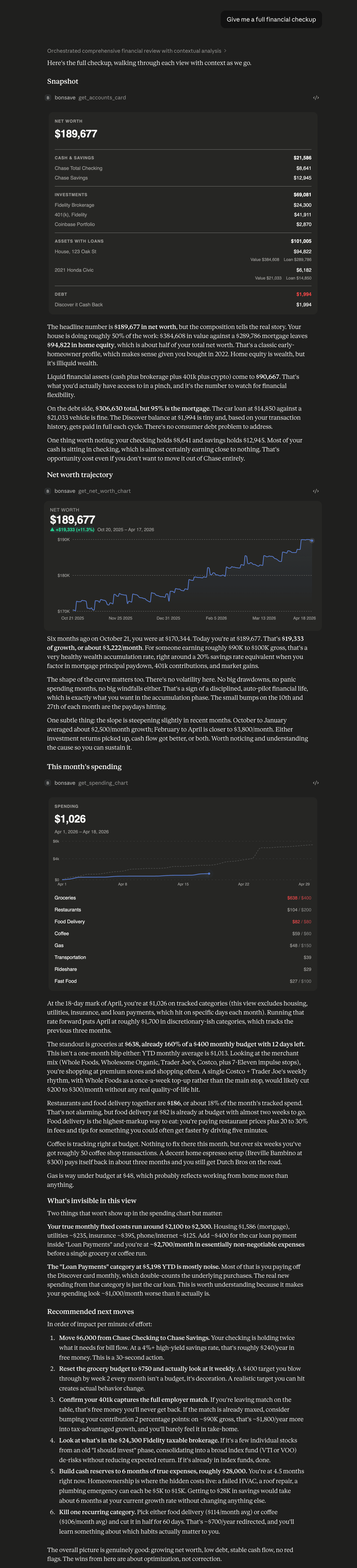
A personal finance MCP server uses the Model Context Protocol (MCP) to give AI assistants like Claude secure, structured access to your financial data. Instead of pasting numbers into a chat, the assistant queries your real accounts, transactions, budgets, and net worth and answers with exact figures. Bonsave's MCP server exposes 8 strictly read-only tools, so your AI can see your finances but never move money or make changes.
Spending
Understand where your money actually goes
Ask about any category, time period, or merchant. Claude pulls from your real transaction history to give you exact numbers, not estimates.
- ›“How much did I spend on dining out last month?”
- ›“Am I on track with my grocery budget?”
- ›“Show me my spending breakdown for Q1.”
- ›“What did I spend at Costco this year?”
Net Worth
Track your trajectory over time
Get a clear picture of how your wealth is growing, where it is concentrated, and whether your savings rate is on track with your goals.
- ›“What is my net worth compared to 6 months ago?”
- ›“How much have I grown my investments this year?”
- ›“Am I on track to retire at 55?”
- ›“What is my savings rate right now?”
Transactions
Dig into the details of any purchase
Search and filter across hundreds of transactions by merchant, category, account, or date range. Claude finds the signal in the noise.
- ›“What were my 5 largest transactions this week?”
- ›“Which account has the highest interest rate debt?”
- ›“Did I get charged for any subscriptions I forgot about?”
- ›“What did I spend on Amazon last quarter?”
Other questions you can ask
8 read-only financial tools
Every tool is strictly read-only. Your AI assistant can see your data and answer questions, but it cannot move money or make changes.
Accounts
All linked accounts with live balances across banks, brokerages, credit cards, and loans.
Net Worth
Total net worth broken down by cash, investments, and debt.
Net Worth History
Daily net worth snapshots over a custom date range. Great for trend questions.
Transactions
Search and filter transactions by merchant, category, account, or date.
Spending
Spending totals by category for any date range, excluding transfers and income.
Budgets
Budget targets by category so your AI can compare spending to your goals.
Holdings
Manually tracked assets like real estate, crypto, and vehicles with values and loan balances.
Charts
Render interactive net worth and spending charts directly in the chat window.
How do I connect my budget to Claude?
Setup takes a few minutes. Once connected, Claude can answer questions about your budgets, spending, and net worth from your real data.
Generate a token
Go to Settings in Bonsave and generate an MCP token. Give it a name like "Claude Desktop" so you can identify it later.
Connect your AI assistant
Paste the credentials into Claude Desktop's config file, or enter the client ID, token endpoint, and client secret to connect through claude.ai. All values are shown in Settings.
Start asking questions
Ask Claude things like "How much did I spend on groceries last month?" or "What is my net worth trend this year?" and get answers from your real data.
Is it safe to connect my financial data to an AI assistant?
Yes. Bonsave MCP tokens are hashed before storage and never logged. Each token grants read-only access limited to your own data. You can revoke any token from Settings at any time, and access is rate-limited to 500 requests per hour.
MCP uses OAuth 2.0 client credentials for claude.ai and Bearer token auth for Claude Desktop.
Personal finance MCP questions
Updated July 2026
Which AI assistants work with the Bonsave MCP server?+
Any MCP-compatible client. Bonsave supports claude.ai through OAuth 2.0 client credentials and Claude Desktop through Bearer token auth, and other assistants that speak the Model Context Protocol connect the same way.
Can the AI assistant move my money or change my accounts?+
No. All 8 Bonsave MCP tools are strictly read-only. Your AI assistant can see balances, transactions, budgets, and net worth to answer questions, but it cannot move money, edit data, or make changes of any kind.
Do I need a specific plan to use the Bonsave MCP server?+
MCP access is included on the Pro and Ultra plans. Every plan starts with a 14-day free trial, so you can connect Claude to your finances before paying anything.